
Support that feels human. Tools that save you time.
Advocate360 is the only place that connects the dots between executive function insights, goals, and next steps, so you can support the whole person.
Inspired By People Like You
And created by the people who do the work and have lived the neurodivergent experience.
Collect Data

Write Goals
Teach Skills
(Then adjust over time.)
In theory...
But in practice, it can get messy, and the dots don’t always connect.
That's where Advocate360 comes in.

Where People Get Stuck

Advocate360...
Inside Advocate360
Your 360° View
Three tools you can use. Great apart. Even better together.
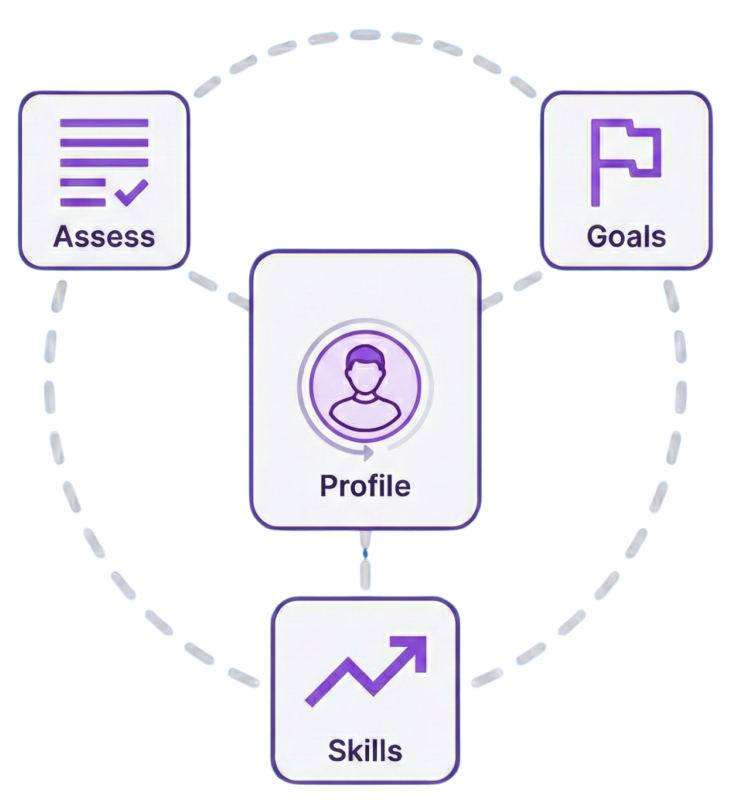
Explore Each of the Interconnected Tools Inside Advocate360
All centered around profiles you create.

Executive Function Assessment
Make Understanding Executive Function Needs Easy.
Goal Generator
Write Goals That Reflect The Whole Person. Every Time.
Skill Building & Resource Library
Move From “Goal Written” to “Skills in Motion”
Who Advocate360 Is For
(and Who It May Not Be For)
Advocate360 supports executive function from insight to next steps, whether you use one tool or all of them.
Who it’s for
Who it may not be for
Two Rather Large Elephants In The Room
If you’re wondering about privacy and AI, you’re not alone. Here’s how Advocate360 handles both.
Privacy
Built for FERPA-aware work. Advocate360 encourages de-identified use and flags common identifiers before you save or share.
Responsible AI Use
AI helps with drafting, not deciding. You review, edit, and approve what gets used.
Start with a 7-day free trial. No credit card required.
Early subscriber pricing is available for a limited time.
Need more time? You'll have the option to request a trial extension.
individual
$10 / mo
Launch pricing
No credit card required.
Supporter
Teachers, parents, coaches, etc.
$20 / mo
Launch pricing
No credit card required.
Organization
Schools, districts, clinics, coaching companies, etc.
Request a Quote
A profile can be created for anyone: a student, child, client, or yourself.
Frequently Asked Questions
Getting Started
Advocate360 is an AI-assisted platform designed to help you understand and connect executive function skills and needs to goals and skill-building activities, so you can spend less time on figuring things out and more time supporting.
Educators, clinicians, parents, coaches, other supporters, and neurodivergent adults who want a clearer path from “What’s going on?” to “What do we do next?”
Advocate360 is built by Life Skills Advocate, led by Chris Hanson (former special education teacher, executive function coach, ADHD lived experience).
Parts of the system, like the executive function assessment for example, were developed with practicing professionals.
No. You can use it for IEPs, 504 supports, MTSS, coaching plans, or personal skill building. If you have to write an IEP, it can help you draft goals, accommodations and modifications faster. If you don’t, it still helps you organize needs and next steps.
No. Advocate360 is not a system of record. It helps you draft, organize, and export work, and then you decide what gets copied into your official system.
Inside Advocate360, a profile is a workspace for one learner. It’s where you can keep assessment results, drafts, and resources tied to the same person.
Yes. Many people use the assessment and skill-building tools to understand their own patterns and build routines without needing school paperwork.
No. Advocate360 is built around skill needs and context, not labels.
It’s designed to support ages 5 through adulthood, with wording and resources that can be adjusted by age and setting.
No. It’s a drafting and organization tool. You and your team still make decisions about evaluation, eligibility, services, and final wording.
Yes. Email support at advocate360@lifeskillsadvocate.com. We typically respond within one business day.
We start with email so you can keep moving while you’re actively using the tool.
If a call is truly the fastest way to solve it, we’ll suggest that next.
Executive Function Assessment
It helps you identify which executive function skills are most likely getting in the way, so you can start with the right “why”, not just the visible behavior.
The assessment was developed by Chris Hanson (special education teacher and founder of Life Skills Advocate), Amy Sippl, BCBA, and Jennifer Schmidt, M.S. Ed. (school psychologist).
Not in the “traditional scientific validation” sense. We describe it as a data-informed tool built using questionnaire data from our coaching client base, practical real-life use, and a strengths-based framing.
It’s meant to be a starting point for reflection and skill planning, not a diagnostic instrument.
Advocate360 includes multiple versions (example: foundational vs comprehensive), and can be completed as a self-report or “someone else reporting”. Formats options include text-based and visual.
You can take it yourself, have a learner take it, or have a supporter (parent, teacher, clinician) take it.
Yes. When needed, the assessment is designed to be completed in chunks, with progress saved.
Yes. You can add comments during the assessment so the results reflect real-life context, not just scores.
Yes. You can share a link so a parent, teacher, or learner can complete it, and the results return to the right profile.
A clear report that highlights priority skills, explains patterns, and gives next-step suggestions. Exports are available so you can save or share the report
No. It’s a structured way to organize observations and responses into an executive function profile. It does not diagnose ADHD, autism, learning disabilities, anxiety, or anything else.
Yes. You can re-test as often as you want, and the results stay connected to the profile so you can compare over time.
Goals & Drafting
It helps you draft goals, objectives, and related pieces using assessment results and the context you provide. It’s built to reduce rewriting and “starting from blank page” fatigue.
No. Uploading can save time, but you can also start from scratch and add only the context you want.
Advocate360 is designed to remove obvious identifiers before storage, then pull useful context (like present levels) into the goal-writing workflow.
Yes. It can help you identify and attach standards, so goals stay grounded in what learners are expected to access.
Yes. It can draft both, and you can refine with your own instructions. Nothing is locked.
Yes. It can generate recommendations and also lets you search and filter options. You still choose what fits your setting and policies.
After creating a goal, there's a "How this goal was created" section.
It’s a plain-language explanation of what inputs shaped the draft (example: assessment insights, present levels, strengths, needs). The point is to keep the reasoning visible, especially for team conversations.
It can flag common issues (example: whether a goal reads like a SMART goal, whether it appears to include identifiers, whether standards are attached). Think of it as “spellcheck for compliance friction”, not a guarantee. AI can get things wrong so Advocate360 users are still responsible for ensuring that the final goal matches what the individual needs.
Yes. You can draft goals in plain language for coaching, home routines, clinic plans, or adult goals.
Advocate360 can help you draft goals and define what “measuring progress” looks like. It does not automatically collect data from your classroom systems. You decide how you’ll collect, record, and report progress.
Skill Building & Resource Library
It is a skill-building library designed to bridge the gap between “we wrote a goal” and “we know what to practice next.”
Activities are organized by executive function skill area and skill level, and include steps, mastery criteria, and ways to expand practice.
At launch, the library includes about 90 exercises (including the core set from Life Skills Advocate’s Real-Life Executive Function resources), and the library grows over time.
New resources are added over time. We avoid promising an exact monthly number, because quality and usefulness matter more than hitting a quota.
It means you can take a base activity and ask Advocate360 to rewrite it using the context you choose about an profile you're working from (example: age, setting, goal focus, interests). It is a starting draft, and you can edit it.
Yes. Activities can be saved and assigned so the profile keeps the plan connected
Yes. You can download activities and materials when you need offline copies.
No. Skill Building is a structured library of exercises with clear steps, mastery criteria, and expansion ideas.
Many of the approaches come from Life Skills Advocate’s Real-Life Executive Functioning Workbook, which includes 11 chapters and 81 exercises, written by Chris Hanson, Amy Sippl, BCBA, Jennifer Schmidt, M.S. Ed. (school psychologist).
Advocate360 also includes additional Skill Building resources that are added over time.
Privacy and FERPA
No. Advocate360 is designed to work with de-identified profiles (initials, nicknames, role labels) and does not add names, photos, or directory-style info for you.
Advocate360 is designed to flag likely PII before you save or export, so you can correct it early.
Yes. Advocate360 uses encryption in transit (HTTPS/TLS) and at rest.
What does “encrypted in transit (HTTPS/TLS)” mean?
It means when data moves between your browser and our servers, it travels through an encrypted connection, which helps prevent someone on the network (like public Wi‑Fi) from reading it in transit.
What does “encrypted at rest” mean?
It means data stored in the database is encrypted while it sits on the server, which helps protect it if someone were to gain access to stored files directly.
By default, only you (the person logged into your account) can access the data you create. No other users can view your profiles.
Life Skills Advocate staff may access user accounts for support purposes when necessary, and that access is logged.
Absolutely not.
No. Advocate360 uses AI through a secured API, and we do not allow your inputs or outputs to be used to train the provider’s public AI models.
Why this is a reason to use Advocate360 instead of regular chat interfaces
General chat tools are designed for open-ended conversation, which makes it easy to paste in more sensitive detail than you meant to.
Advocate360 is built for this specific workflow and helps you stay on safer rails by:
- Encouraging de-identified inputs (initials, nicknames, role labels)
- Flagging common identifiers before you save or export
- Keeping learner profiles separated inside your account
- Keeping AI use focused on drafting and rewriting, with you reviewing and approving what gets used
Advocate360 is FERPA-aware and built to support FERPA-governed use, but FERPA compliance depends on your district policies, disclosures, and contracts.
For many school-based student records, FERPA is the main privacy law. Advocate360 is designed around education workflows and FERPA-aware handling.
Some clinicians may still use Advocate360, and in some settings HIPAA could be relevant. Today, Advocate360 is not positioned as a HIPAA-compliant medical record system or a replacement for an EHR.
HIPAA support may be explored in the future, but this will depend directly on user feedback.
If you require a BAA or HIPAA-specific guarantees, check with your organization before entering protected health information.
Yes. You can delete profiles and associated materials from your dashboard. If you need a deletion confirmation or audit report for procurement, contact support.
We’re assembling a short set of vendor-ready documents (security overview, retention summary, and subprocessors list).
If your district needs this for review, email us at advocate360@lifeskillsadvocate.com and we’ll respond with what we have available and the fastest path to a decision.
Pricing, Trial, and Plans
Advocate360 offers a 7-day free trial with no credit card required to start.
The free trial includes full access to all features so you can get a true feel for it.
Plans are designed around number of profiles.
For $10/month, an Individual plan includes 1 profile
For $20/month, a Supporter plan includes up to 10 profiles, with the option to add more.
If you don’t upgrade, the platform can limit features, but you can still access what you’ve already created.
You will also have lifetime access to our entire resource library with over 90 resources located in the "Resources" section.
Any free resource you request from the Life Skills Advocate website will be available ongoing as well and will live inside the "My Materials" section.
Yes. School/Org options are available by conversation, since needs vary (number of users, procurement, onboarding, and privacy review).
AI
AI can draft quickly, but it can miss nuance. Treat drafts as a first version. You review, edit, and decide what’s appropriate for the learner and your setting.
No tool can guarantee compliance across districts and states. Advocate360 can help you draft clearer, measurable language and keep your reasoning visible, but your team is responsible for final decisions and compliance checks.
AI can sometimes produce plausible-sounding extra details. That’s why Advocate360 is built around review and revision. If something doesn’t match your data, remove it.
Use de-identified inputs, provide the minimum needed context, and treat outputs as drafts that require your professional review.
Created By People Like You
Advocate360 was built by people who know the paperwork, the meetings, and the real-world constraints.
Educators, clinicians, and coaches helped shape it so it stays practical, clear, and respectful of privacy.


Chris Hanson
Dad, Special Education Teacher, ADHDer, Founder of LSA, Cleveland Guardians Fan

Joe Coleman
Dad, ADHDer, Pop Technologist, Documentary Watcher

Jennifer Schmidt
School Psychologist, Writer, Gamer, Ailurophile, Homebody

Amy Sippl
New Mom, BCBA, Creator, National Parks Enthusiast
With a Very Special Thanks to the Following People Who Helped Inspire & Bring Advocate360 to Life
The Neurodivergent Community
Supporters of Neurodivergent People
The Advocate360 Beta Testers
Karrissa Doree
Webster Munoz
Kyle Mosler
Ian Adams
Joel Spalding