

Goal Generator
Write Goals That Reflect The Whole Person. Every Time.
Draft clear, measurable goals grounded in real context, including executive function needs.

Why does executive function matter when setting goals?
Why does executive function matter when setting goals?
Executive function skills are the mental “follow-through” processes, like planning, maintaining attention, resisting distractions, and adjusting when things change.
When goals name those needs, the next steps and supports are clearer and there’s less ambiguity about what to do.
For example:
Goal That is NOT Grounded in Executive Functioning Needs
When given five grade-level story problems, the student will correctly solve at least 4 out of 5 problems on 3 consecutive weekly curriculum-based probes, in 4 out of 5 opportunities, by the annual IEP review date.
Goal That IS Grounded in Executive Functioning Needs
When given a teacher-provided 3-step problem solving checklist, a visual timer, and five grade-level story problems, the student will use the checklist to plan, monitor, and check their work and correctly solve at least 4 out of 5 problems on 3 consecutive weekly curriculum-based probes, in 4 out of 5 opportunities, by the annual IEP review date.
Advocate360 pulls in executive function assessment findings from the integrated assessment module and prompts you to add what matters.
You stay in control from start to finish, whether you’re writing IEP goals for an IEP or setting goals in any other context.
How Advocate360 Helps You Write Goals That Reflect the Whole Person

Click to enlarge
Choose The Right Goals for Your Role
Choose The Right Goals for Your Role
Not just for IEP goals.
Choose between IEP Goals and SMART Goals. Advocate360 helps you start with the format that fits your role.
The IEP Goals mode keeps PLAAFP, standards, objectives, and supports connected, while the SMART Goals mode keep goal-writing simple and measurable.
Not just for IEP goals.
Choose between IEP Goals and SMART Goals. Advocate360 helps you start with the format that fits your role.
The IEP Goals mode keeps PLAAFP, standards, objectives, and supports connected, while the SMART Goals mode keep goal-writing simple and measurable.
Next Up: Skills >>
Connect Goals to Context
With Advocate360, you can populate a profile with:
- An Advocate360 executive function assessment
- A prior or in-progress IEP
- A formal evaluation
- An outside assessment report
- Common Core or state-specific standards
- Anything else you have
Advocate360 automatically anonymizes uploaded documents and uses that context to draft better-fit goals, with full control to edit along the way.
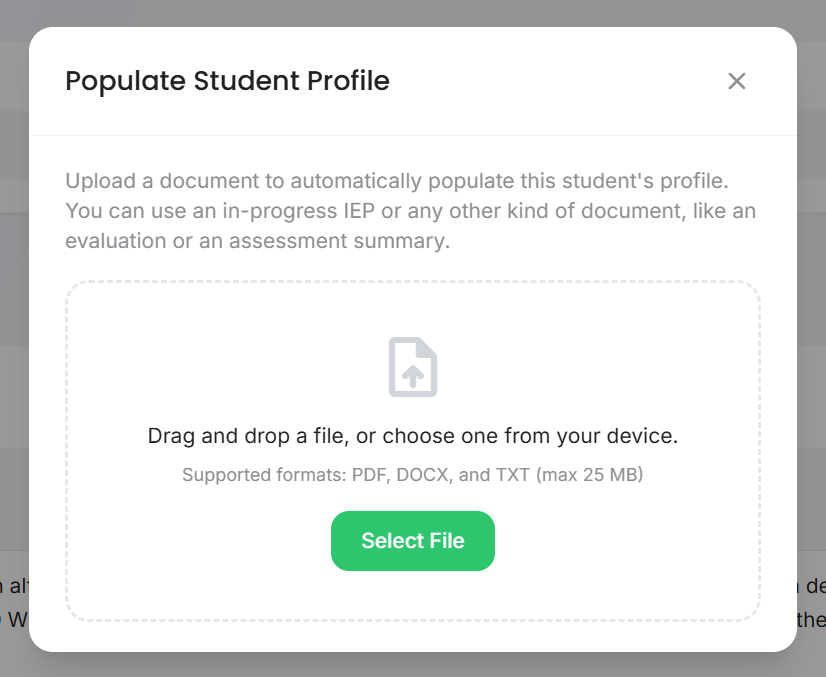
Click to enlarge
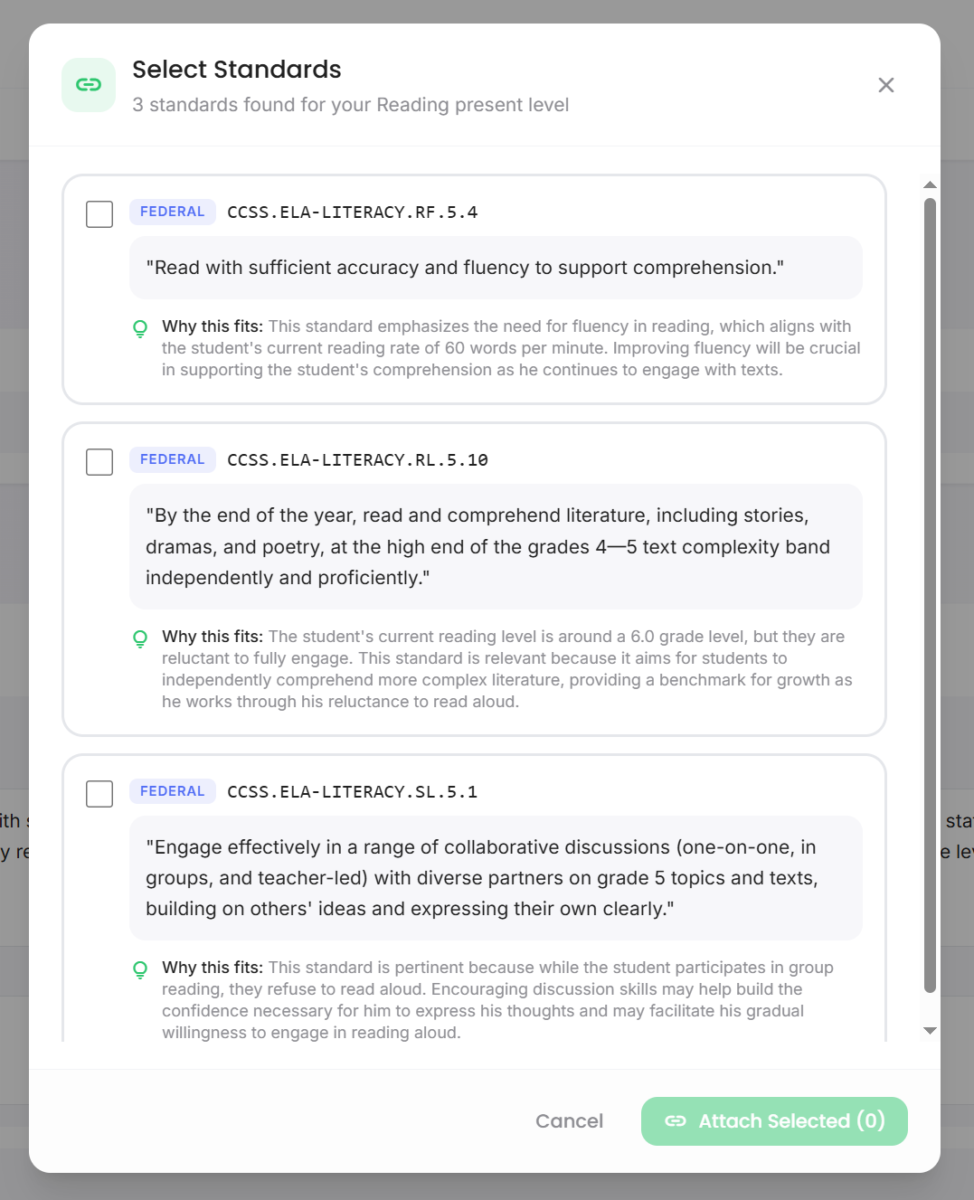
Click to enlarge
Connect Goals to Context
With Advocate360, you can populate a profile with:
- An Advocate360 executive function assessment
- A prior or in-progress IEP
- A formal evaluation
- An outside assessment report
- Common Core or state-specific standards
- Anything else you have
Advocate360 automatically anonymizes uploaded documents and uses that context to draft better-fit goals, with full control to edit along the way.
Click to enlarge
Click to enlarge
Privacy = Priority
Advocate360 is FERPA-aware and encourages using pseudonyms, automatically anonymizes uploaded documents before storage, and flags potential PII in IEP goals before you finalize or share.


Click to enlarge
Quickly Define The Goal
Quickly Define The Goal
Set the goal focus, then choose whether you want short-term objectives or just the annual goal.
Advocate360 generates a clear draft, and you can refine anything that does not match your intent.
Set the goal focus, then choose whether you want short-term objectives or just the annual goal.
Advocate360 generates a clear draft, and you can refine anything that does not match your intent.
And Watch It Come To Life
And Watch it Come To Life
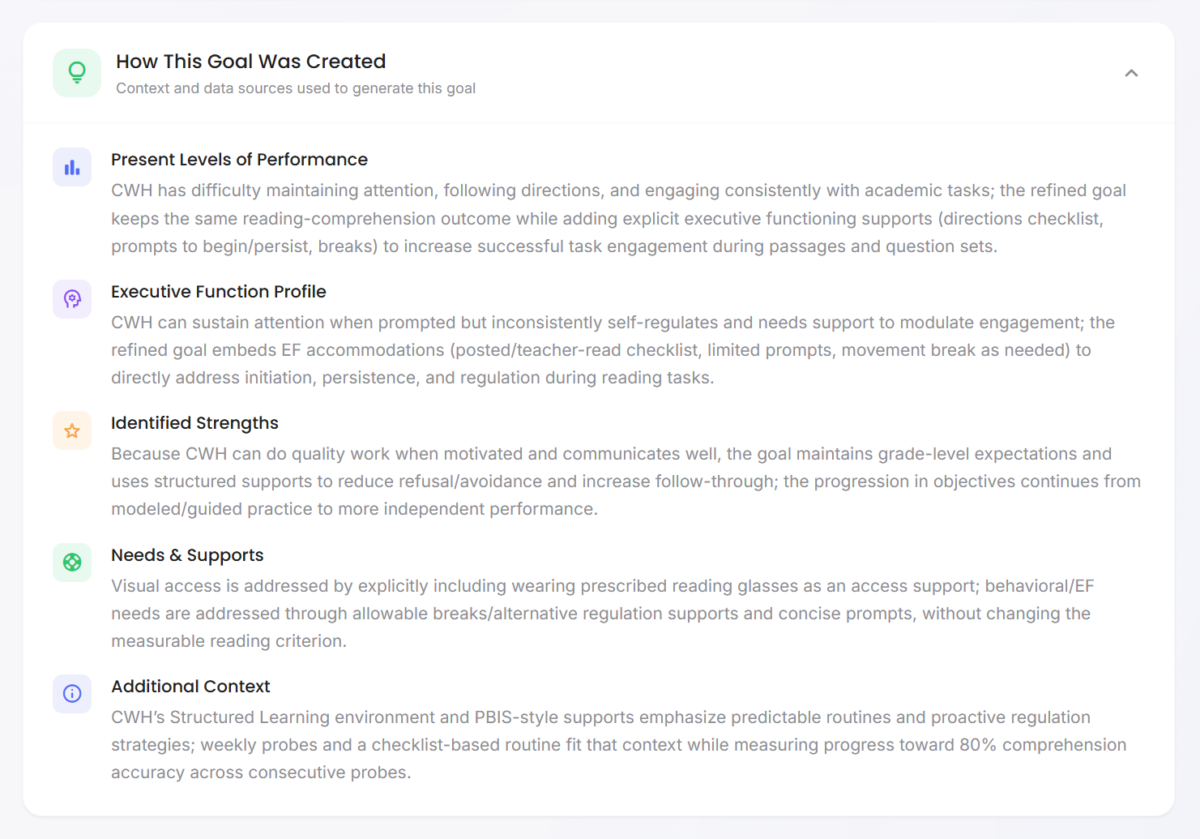
With full transparency about how how the goal was created.
Goal & Objectives That Reflect Real Needs
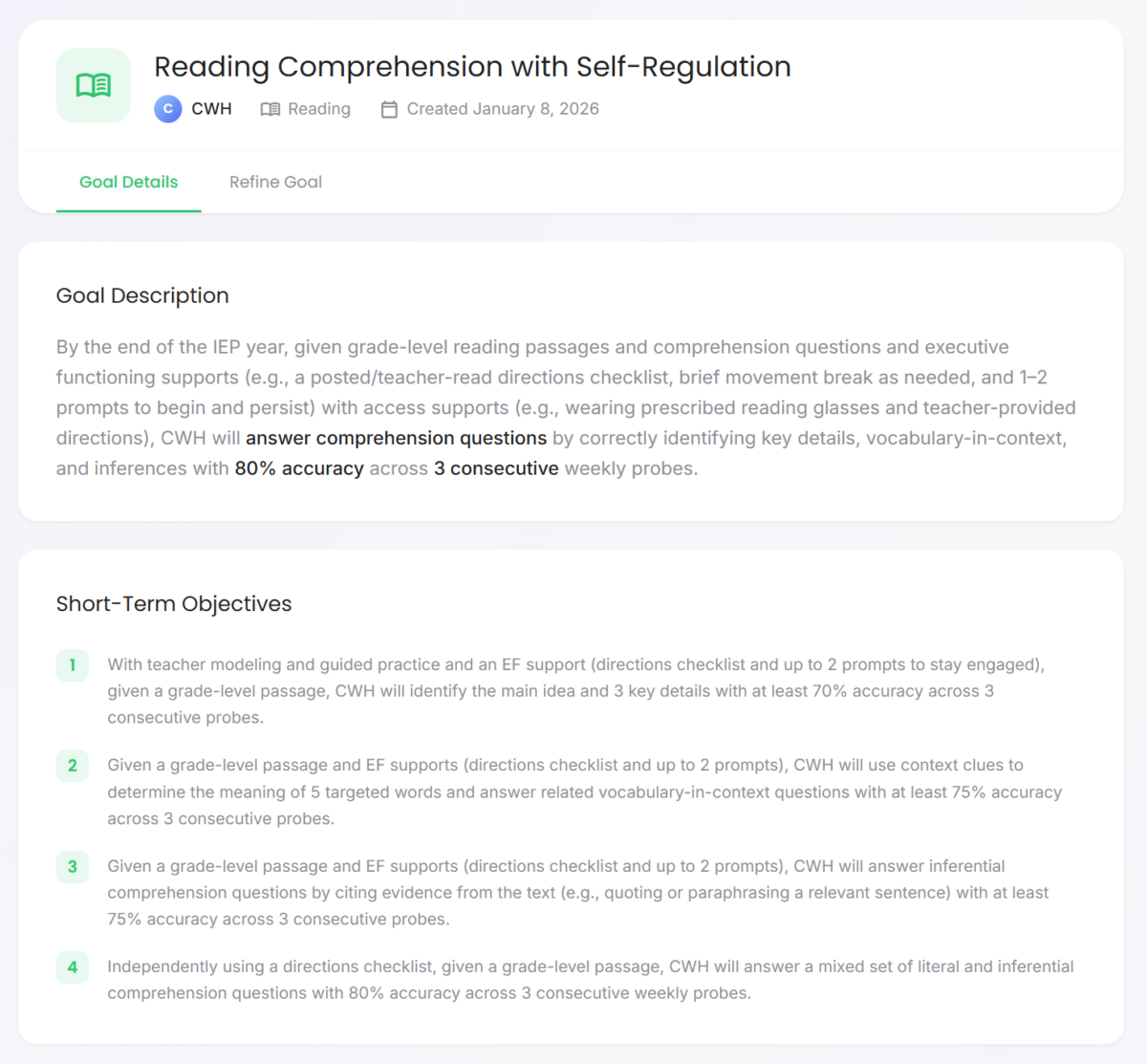
How This Goal Was Created Transparency
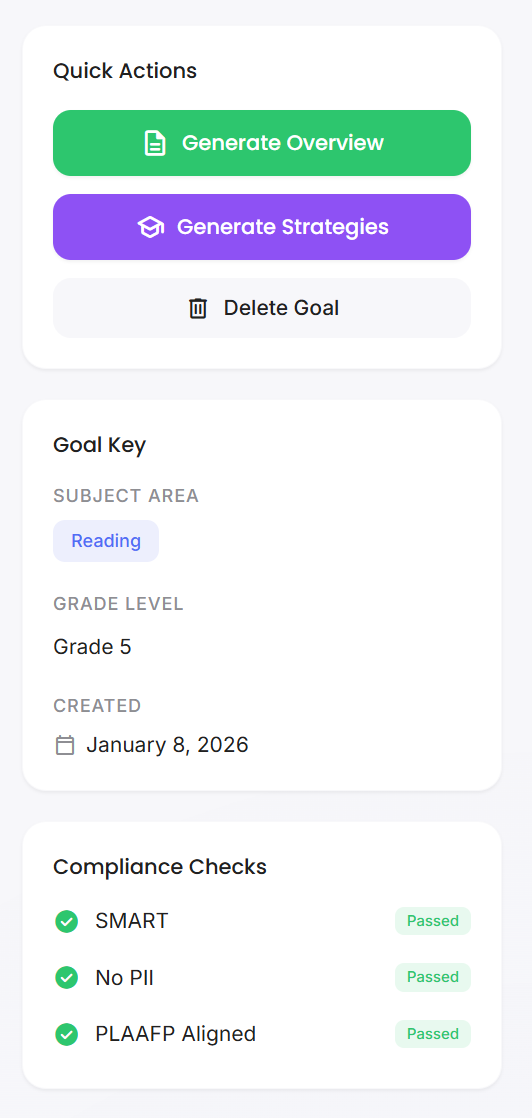
Quick Actions & Compliance Checks
Download an example overview & quick one-pager here.
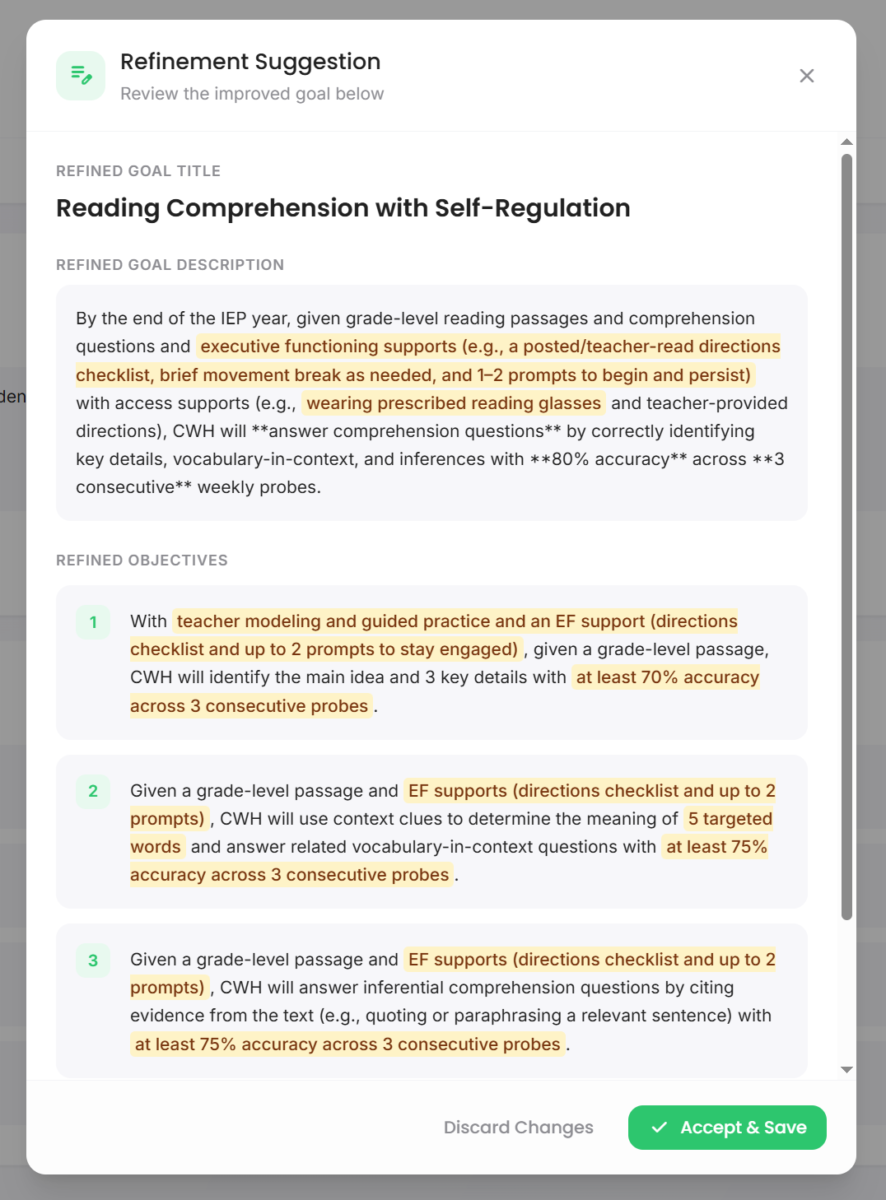
Quickly Refine The Goal If Needed
Tell Advocate360 exactly what you need or use the quick action refinements.
Changes will be highlighted for review.

Click to enlarge
Click to enlarge
Quickly Refine The Goal If Needed
Tell Advocate360 exactly what you need or use the quick action refinements.
Changes will be highlighted for review.
Click to enlarge
Click to enlarge
Click to enlarge
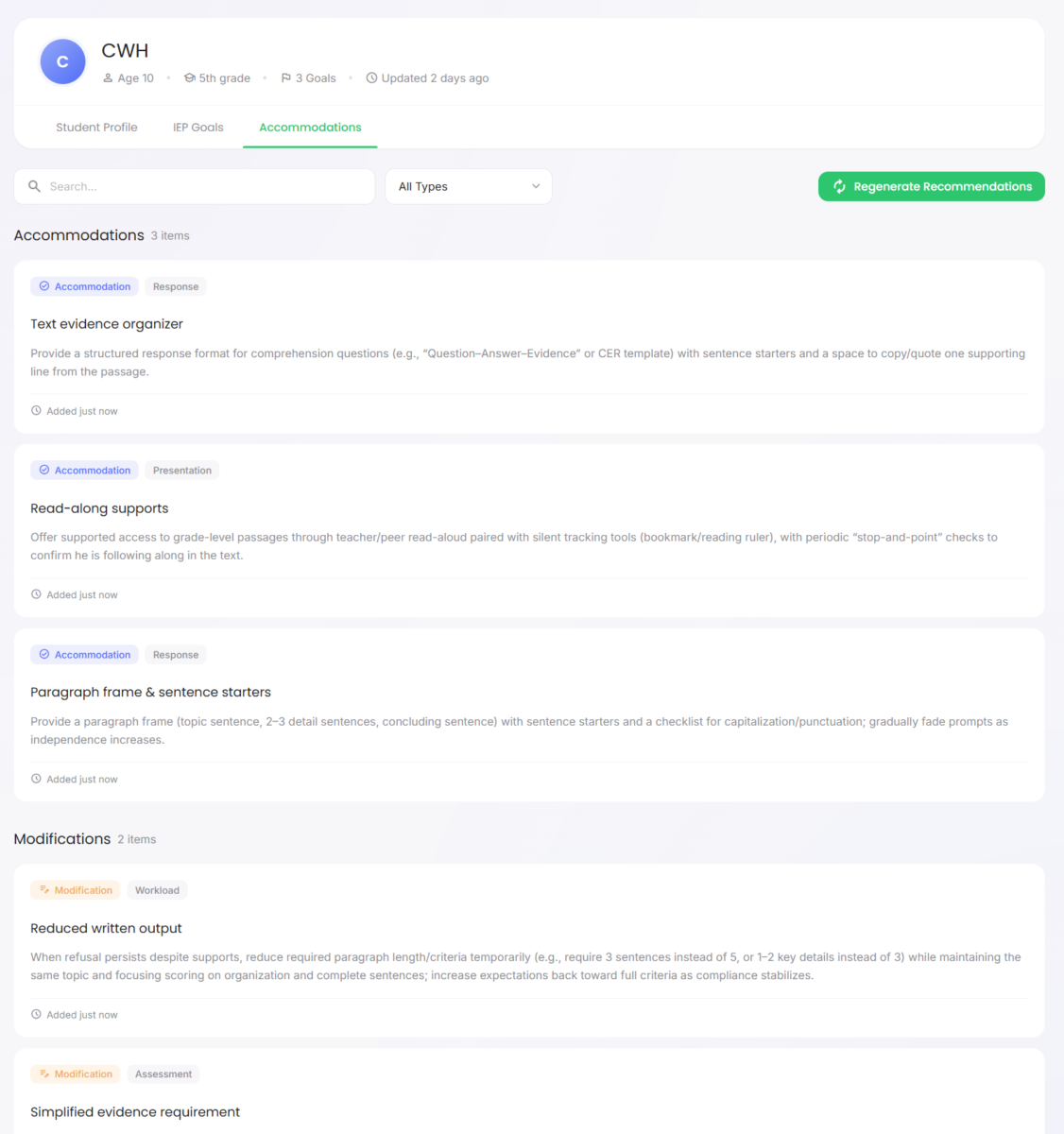
Generate accommodation Ideas
Generate accommodation Ideas
Modifications too!
Modifications too!
Examples
Ari
Ari is a 1st grader who understands his morning routine, but arrival at school can still go off track: the folder stays in the backpack, materials end up in the wrong spot, and work time starts late.
Ari has executive function needs in working memory, task initiation, and cognitive flexibility, so moving from step to step is harder without a clear sequence and a visual reminder.
Goal Before Advocate360
When arriving to class, Ari will complete the morning routine independently within 5 minutes of arriving at school in 4 out of 5 opportunities.
Goal After Advocate360
When arriving to class, given access to a picture-based checklist, Ari will use the checklist to complete each step of the morning routine (hang backpack, turn in folder, take out materials, start warm-up) with all steps completed, and begin the warm-up activity within 5 minutes of arriving at school, in 4 out of 5 school days.

How Advocate360 Helps
Ari’s executive function assessment highlights needs in working memory, task initiation, and shifting between tasks.
Advocate360 pulls those findings into the goals module automatically and can generate goal language that connects the routine to concrete steps and supports (like a picture-based checklist), while you stay in control to edit and approve what’s included.
The Impact
What changed?
The goal now measures both the routine outcome and the follow-through skills that make the routine possible.
- Less guesswork: You are measuring both routine completion and starting on time.
- More usable supports: The goal points directly to what helps Ari remember the steps and begin.
- Cleaner progress data: If mornings are still hard, you can see whether steps were missed or the start was delayed.
- Better carryover: The same checklist approach can transfer to pack-up time and transitions.
- More wins for Ari: A more predictable start can mean fewer rushed moments and more time learning.
Devin
Devin is a 5th grade student with strong math reasoning skills, but multi-step word problems are tough because it’s easy to lose track of what the question is asking.
Devin has executive function needs in working memory and self-monitoring, so steps get skipped and answers do not always match the plan.
Goal Before Advocate360
When given multi-step word problems, Devin will solve the problem with at least 80% accuracy on 3 consecutive weekly probes.
Goal After Advocate360
When given a multi-step word problem, with access to a teacher-provided problem-solving checklist, Devin will use the checklist to complete the problem-solving steps (identify what is being asked, list key numbers, choose an operation, check the answer) with all steps completed, and solve the problem with at least 80% accuracy on 3 consecutive weekly probes.
How Advocate360 Helps
Devin’s executive function assessment highlights needs in working memory, planning, and self-monitoring.
Advocate360 pulls those findings into the goals module automatically and can generate a goal draft that includes both the academic outcome and a process measure (like a problem-solving checklist), while you keep control of the wording and supports.
The Impact
What changed?
The goal now measures the math outcome and the “keep track of the steps” skills the task requires.
- Less guesswork: You can tell whether the issue was the math skill or losing track of the steps mid-problem.
- More usable supports: The checklist gives Devin a clear plan for what to do next.
- Cleaner progress data: You can track checklist completion separately from accuracy.
- Better carryover: The same routine can apply to other multi-step work, like science questions and written responses.
- More wins for Devin: Fewer “I knew it, but I lost my place” moments, and more chances to show what he understands.
Mina
Mina is a 7th grader who participates in class and understands the material, but missing assignments stack up because papers, links, and due dates end up in different places.
Mina has executive function needs in organization and time management, so she might complete the work but misplace it, forget a digital upload step, or miss the turn-in moment.
Goal Before Advocate360
When given weekly assignments, Mina will submit completed assignments by the due date in 80% of opportunities across a grading period.
Goal After Advocate360
When given a daily planner and a teacher-provided end-of-day checklist, Mina will record the assignment and due date for each class, place materials in the correct folder (paper or digital), and submit completed assignments by the due date in 4 out of 5 assignments per week for 6 consecutive weeks.
How Advocate360 Helps
Mina’s executive function assessment highlights needs in organization, planning, and time management.
Advocate360 pulls those findings into the goals module automatically and can generate goal language that includes system steps (like a planner routine or end-of-day check) alongside the submission target, while you decide which supports to include.
The Impact
What changed?
The goal now measures the math outcome and the “keep track of the steps” skills the task requires.
- Less guesswork: You can see whether the problem was recording the work, organizing it, or submitting it.
- More usable supports: The goal names a simple routine that can be practiced daily.
- Cleaner progress data: Planner checks and submission records make progress easier to track.
- Better carryover: The same routine can support long-term projects and studying for tests.
- More wins for Mina: Fewer missing assignments and fewer last-minute scrambles, at school and at home.
Jordan
Jordan is a 9th grader who can explain ideas out loud really well, but written essays are often late, missing parts, or hard to follow.
Jordan has executive function needs in planning, organization, task initiation, and working memory, so even when he understands the topic, it’s harder to track requirements, start on time, and carry the plan through.
Goal Before Advocate360
When given a grade-level writing prompt, Jordan will write a 5-paragraph opinion essay that includes a clear claim, three supporting reasons with evidence, and a conclusion, scoring at least 3 out of 4 on the writing rubric in 4 out of 5 opportunities.
Goal After Advocate360
When given a grade-level writing prompt, with access to a teacher-provided planning checklist and graphic organizer, Jordan will use the organizer to plan the essay (claim, three reasons, evidence) with all required elements completed, and write a 5-paragraph opinion essay that includes a clear claim, three supporting reasons with evidence, and a conclusion, scoring at least 3 out of 4 on the writing rubric in 4 out of 5 opportunities.
How Advocate360 Helps
Jordan’s executive function assessment highlights needs in planning, organization, task initiation, and working memory.
Advocate360 pulls those findings into the goals module automatically and can generate a goal draft that links the writing outcome to a planning routine (like an organizer and checklist), while you stay in control from start to finish.
The Impact
What changed?
The goal now measures both the outcome and the follow-through skills that make the outcome possible.
- Less guesswork: You are measuring both the writing skill and the steps that make the writing possible.
- More usable supports: The goal points directly to what helps Jordan start, stay organized, and finish.
- Cleaner progress data: If the essay is weak, you can see whether the issue was planning, drafting, or both.
- Better carryover: The planning routine can transfer to other writing tasks, and even other classes.
- More wins for Jordan: Clear steps and supports reduce “where do I start?” moments, so Jordan is more likely to begin on time, finish the full assignment, and feel confident showing what they know.
Tasha
Tasha is a working adult who is engaged and effective when tasks are happening right in front of her, but sometimes misses appointments when details are scattered across email, texts, and sticky notes.
Tasha has executive function needs in working memory and time management, so anything scheduled for later can fade from view until it feels urgent.
Goal Before Advocate360
Tasha will attend scheduled appointments on time for 80% of her appointments over 8 weeks.
Goal After Advocate360
When using a digital calendar and a daily 10-minute planning check-in, Tasha will add appointments to the calendar within 24 hours of scheduling, set two reminders (6 hours and 1 hour before), and arrive within 5 minutes of the start time for 80% of her appointments over 8 weeks.
How Advocate360 Helps
Tasha’s executive function assessment highlights needs in time management and working memory.
Advocate360 pulls those findings into the goals module automatically and can generate a SMART goal draft that includes planning and reminder steps in addition to the on-time outcome, with every part being editable.
The Impact
What changed?
The goal now measures the outcome and the system that supports follow-through.
- Less stress: Fewer “oh no, that’s today” surprises.
- Clearer follow-through: Appointments are captured quickly, with reminders that match how Tasha actually remembers.
- Steadier routines: Being on time more often supports work, health, and relationships.
- More independence: A repeatable system reduces how much Tasha has to rely on memory or last-minute reminders. itself.
- Confidence she can build on: A repeatable system builds trust in the plan and her own capabilities.
Two Rather Large Elephants In The Room
If you’re wondering about privacy and AI, you’re not alone. Here’s how Advocate360 handles both.
Privacy
Built for FERPA-aware work. Advocate360 encourages de-identified use and flags common identifiers before you save or share.
Responsible AI Use
AI helps with drafting, not deciding. You review, edit, and approve what gets used.
Start with a 7-day free trial. No credit card required.
Early subscriber pricing is available for a limited time.
Need more time? You'll have the option to request a trial extension.
individual
$10 / mo
Launch pricing
No credit card required.
Supporter
Teachers, parents, coaches, etc.
$20 / mo
Launch pricing
No credit card required.
Organization
Schools, districts, clinics, coaching companies, etc.
Request a Quote
A profile can be created for anyone: a student, child, client, or yourself.
Explore Each of the Interconnected Tools Inside Advocate360
All centered around profiles you create.

Executive Function Assessment
Make Understanding Executive Function Needs Easy.
Skill Building & Resource Library
Move From “Goal Written” to “Skills in Motion”
Frequently Asked Questions
Goals & Drafting
It helps you draft goals, objectives, and related pieces using assessment results and the context you provide. It’s built to reduce rewriting and “starting from blank page” fatigue.
No. Uploading can save time, but you can also start from scratch and add only the context you want.
Advocate360 is designed to remove obvious identifiers before storage, then pull useful context (like present levels) into the goal-writing workflow.
Yes. It can help you identify and attach standards, so goals stay grounded in what learners are expected to access.
Yes. It can draft both, and you can refine with your own instructions. Nothing is locked.
Yes. It can generate recommendations and also lets you search and filter options. You still choose what fits your setting and policies.
After creating a goal, there's a "How this goal was created" section.
It’s a plain-language explanation of what inputs shaped the draft (example: assessment insights, present levels, strengths, needs). The point is to keep the reasoning visible, especially for team conversations.
It can flag common issues (example: whether a goal reads like a SMART goal, whether it appears to include identifiers, whether standards are attached). Think of it as “spellcheck for compliance friction”, not a guarantee. AI can get things wrong so Advocate360 users are still responsible for ensuring that the final goal matches what the individual needs.
Yes. You can draft goals in plain language for coaching, home routines, clinic plans, or adult goals.
Advocate360 can help you draft goals and define what “measuring progress” looks like. It does not automatically collect data from your classroom systems. You decide how you’ll collect, record, and report progress.
Privacy and FERPA
No. Advocate360 is designed to work with de-identified profiles (initials, nicknames, role labels) and does not add names, photos, or directory-style info for you.
Advocate360 is designed to flag likely PII before you save or export, so you can correct it early.
Yes. Advocate360 uses encryption in transit (HTTPS/TLS) and at rest.
What does “encrypted in transit (HTTPS/TLS)” mean?
It means when data moves between your browser and our servers, it travels through an encrypted connection, which helps prevent someone on the network (like public Wi‑Fi) from reading it in transit.
What does “encrypted at rest” mean?
It means data stored in the database is encrypted while it sits on the server, which helps protect it if someone were to gain access to stored files directly.
By default, only you (the person logged into your account) can access the data you create. No other users can view your profiles.
Life Skills Advocate staff may access user accounts for support purposes when necessary, and that access is logged.
Absolutely not.
No. Advocate360 uses AI through a secured API, and we do not allow your inputs or outputs to be used to train the provider’s public AI models.
Why this is a reason to use Advocate360 instead of regular chat interfaces
General chat tools are designed for open-ended conversation, which makes it easy to paste in more sensitive detail than you meant to.
Advocate360 is built for this specific workflow and helps you stay on safer rails by:
- Encouraging de-identified inputs (initials, nicknames, role labels)
- Flagging common identifiers before you save or export
- Keeping learner profiles separated inside your account
- Keeping AI use focused on drafting and rewriting, with you reviewing and approving what gets used
Advocate360 is FERPA-aware and built to support FERPA-governed use, but FERPA compliance depends on your district policies, disclosures, and contracts.
For many school-based student records, FERPA is the main privacy law. Advocate360 is designed around education workflows and FERPA-aware handling.
Some clinicians may still use Advocate360, and in some settings HIPAA could be relevant. Today, Advocate360 is not positioned as a HIPAA-compliant medical record system or a replacement for an EHR.
HIPAA support may be explored in the future, but this will depend directly on user feedback.
If you require a BAA or HIPAA-specific guarantees, check with your organization before entering protected health information.
Yes. You can delete profiles and associated materials from your dashboard. If you need a deletion confirmation or audit report for procurement, contact support.
We’re assembling a short set of vendor-ready documents (security overview, retention summary, and subprocessors list).
If your district needs this for review, email us at advocate360@lifeskillsadvocate.com and we’ll respond with what we have available and the fastest path to a decision.
Pricing, Trial, and Plans
Advocate360 offers a 7-day free trial with no credit card required to start.
The free trial includes full access to all features so you can get a true feel for it.
Plans are designed around number of profiles.
For $10/month, an Individual plan includes 1 profile
For $20/month, a Supporter plan includes up to 10 profiles, with the option to add more.
If you don’t upgrade, the platform can limit features, but you can still access what you’ve already created.
You will also have lifetime access to our entire resource library with over 90 resources located in the "Resources" section.
Any free resource you request from the Life Skills Advocate website will be available ongoing as well and will live inside the "My Materials" section.
Yes. School/Org options are available by conversation, since needs vary (number of users, procurement, onboarding, and privacy review).
AI
AI can draft quickly, but it can miss nuance. Treat drafts as a first version. You review, edit, and decide what’s appropriate for the learner and your setting.
No tool can guarantee compliance across districts and states. Advocate360 can help you draft clearer, measurable language and keep your reasoning visible, but your team is responsible for final decisions and compliance checks.
AI can sometimes produce plausible-sounding extra details. That’s why Advocate360 is built around review and revision. If something doesn’t match your data, remove it.
Use de-identified inputs, provide the minimum needed context, and treat outputs as drafts that require your professional review.