
In today’s fast-paced work culture, staying on top of tasks, meetings, and deadlines can feel overwhelming, especially when everything seems urgent and time is always in short supply.
For many professionals, the stress of managing multiple responsibilities often spills over into personal time, making it harder to rest, recharge, or stay focused.
This can lead to burnout, especially when managing a packed schedule without the right tools.
That’s where digital productivity tools come in. With the rise of AI-powered scheduling and project management software, more people are turning to technology to help them work smarter, not harder.
This article explores how productivity apps, like Motion AI, can support productivity, executive functioning skills, and well-being.
What is Motion AI?
Motion AI is a work management platform that helps individuals and teams manage their time, tasks, projects, meetings, and documentation in one place. Inside Motion, you can create “AI Employees” such as an AI executive assistant or AI project manager. You can then use tools like AI Tasks, AI Projects, AI Calendar, AI Notes, AI Docs, and AI SOPs to coordinate work between people and AI.
After signing up on usemotion.com, you can access Motion in a browser or desktop app, with mobile apps available mainly for quick task capture and visibility. You connect your calendar(s), email, and other tools so Motion and your AI Employees can schedule work, coordinate meetings, and act on information from the apps you already use. There are a variety of other features depending on the paid plan you choose. Some of those features include:
Task & Project Management
When entering information on tasks, you can describe what needs to be done and how urgent or complex it is. Motion’s AI Tasks can then create, prioritize, and schedule tasks onto your calendar based on deadlines and availability. As priorities change or additional tasks arise, your task list and schedule are automatically reorganized. With AI Projects and project templates, you can map recurring workflows, customize subtasks, and manage timelines in one place.
AI Calendar
All of the tasks you create using Motion’s AI Tasks are scheduled directly onto your calendar in blocks. This creates structured time blocks where your attention is dedicated to specific parts of larger projects. For example, if you estimate that a task will take 3 hours, you can have Motion schedule it in one block or in several shorter blocks spread across your week.
If a task or meeting is later added to your calendar, AI Calendar automatically reschedules and reprioritizes your existing tasks based on your settings. You can also set how much “buffer” time you need between tasks to switch gears and schedule in routines like lunch breaks.
Collaboration
If Motion is used by an organization, the person who leads the project can assign tasks to team members and track progress toward larger goals in a shared AI Workplace. Teams can see each other’s responsibilities and timelines, and leaders can coordinate both human teammates and AI Employees in the same place.
When it is time to meet with your team again, Motion lets you share a booking link based on your selected availability. Once your colleagues schedule a meeting, AI Calendar adds it directly to your calendar.
The Rise of AI in Project Management
According to Project.co, the use of artificial intelligence in project management platforms is growing fast. Of the people surveyed who have begun using this software, 58% of project managers said AI has positively impacted project quality in their business, with 37% saying it’s still too early to say. As many as 81% of people surveyed expressed that they will likely use project management software in the future. Some of the following benefits were expressed by those who use the software already:
- Better decision-making (44% of respondents)
- Cost savings (43% of respondents)
- Greater competitiveness in the market (41% of respondents)
- Streamlined communication (38% of respondents)
- Improved resource allocation (34% of respondents)
According to the PwC (2018), digital project management tools could improve productivity by 15–20% (p. 7).
Workflow and Executive Functioning
Small, recurring tasks such as taking/organizing notes, scheduling meetings with a variety of colleagues, and organizing your tasks during the day are necessary to stay on track with deadlines and be productive. However, these tasks take time away from making progress on projects and can drain your mental energy.
Project management software aims to support all employees. These tools can be especially helpful for those with existing executive functioning difficulties. Adults with ADHD are more likely to experience burnout at work due to executive functioning difficulties, especially difficulties with self-management and self-organization/problem-solving.
Self-Management
Self-management is a core executive functioning skill that involves regulating attention, emotions, and behavior. These skills are necessary to stay on task and meet work deadlines. In the workplace, difficulties in this area can look like
- Procrastination
- Trouble starting tasks
- Missed deadlines
- Struggling to transition (or “shift”) between priorities
For neurodivergent adults, these difficulties can lead to increased stress, reduced ability to complete tasks, and lessened well-being. Project management software such as Motion AI can help through AI-powered scheduling tools. Motion’s AI Tasks, AI Projects, and AI Calendar can break large projects into smaller, manageable tasks and prioritize them for you. They can then place those tasks into open time slots during your working hours and update the plan as you add new work. This reduces the cognitive load of manually managing tasks and can support more consistent routines, focus, and workload management.
Self-Organization
Self-organization is the ability to plan, structure and sequence tasks efficiently. At work, difficulties in this area can look like:
- Forgotten details
- Missed steps in a process
- Difficulty managing multiple responsibilities at one time
Motion AI provides a structure that helps you visualize and adjust workflows in real time. This clear, automatic procedure allows users to stay on top of their responsibilities without getting lost in the details.
Time Management
Time management is the ability to plan, organize, and control how you spend your time. Good time management helps you prioritize responsibilities and set attainable deadlines. When someone struggles with this skill, it may look like:
- Having trouble accurately estimating the amount of time tasks take
- Jumping between tasks without finishing them
- Forgetting important deadlines
- Feeling overwhelmed and disorganized
Project management apps often include time management strategies like time blocking. Time blocking is where you schedule specific blocks of time for each task or activity in your day. Instead of keeping a running to-do list, time blocking intends to help you plan when you will work on each item. This makes it easier to stay focused on completing tasks and avoiding distractions.
Honorary Mention: Shifting (Cognitive Flexibility)
Cognitive flexibility, often referred to as “shifting,” is the executive functioning skill that allows individuals to adapt their thinking, change plans, and move between tasks and priorities. In fast-paced working environments, shifting is necessary to move between tasks and adapt to changing needs in the organization, especially when unexpected changes pop up. Difficulties in this area include:
- Becoming mentally “stuck” when overwhelmed
- Difficulties picking up where things were left off, including difficulty getting restarted
- Losing valuable time trying to become reoriented
Project management software like Motion AI helps by making structured task lists and flexible project timelines. These supports can be edited and personalized to fit whatever is necessary to complete projects. When organizations use Motion as a team, it can support collaboration and delegation. People can see their tasks, hand off work to others, and understand how their role fits into the wider project.
Productivity Tools & Well-Being
On average, working adults in the US spend more than half of their waking hours working or doing work-related activities. While many people enjoy their jobs, spending so much time working can make it harder to take care of themselves, spend time with loved ones, or relax. Over time, this can lead to stress and burnout.
Feeling good in your personal life actually helps you do better at work. When people are rested, supported, and have time to enjoy life outside of work, they’re more focused and productive during work hours. On the other hand, when life feels out of control or overwhelming, it’s hard to stay motivated and get things done.
Having the right kind of support at work, such as appropriate accommodations, flexible working schedules, and opportunities for promotion and competitive pay, helps support employee productivity. What if project management tools could help do the same? According to TimeWatch (2024), 63% of people reported that they do not feel like they have things “under control” during the 5-day work week. In addition, 94% of people report that better time management will improve their productivity.
Tools like Motion can help you get work off your mind and into a system that feels more manageable. When your schedule feels clearer, it may be easier to have energy for both work and life, which can support your well-being.
My Personal Experience
As someone juggling multiple professional and personal responsibilities, I was actively searching for a better way to manage my calendar.
My biggest challenge?
Breaking down large projects into smaller, actionable steps and rescheduling everything when unexpected tasks popped up. On my own, these processes are time-intensive and even frustrating at times, especially when multiple tasks pop up at once and other projects need to be put on hold.
I spent some time using the free trial of Motion AI. After creating templates and scheduling tasks and deadlines out on my calendar, the most helpful feature was the ability for Motion to reschedule tasks and still meet deadlines. I did not have to manually rearrange my calendar with each urgent task. This means I can spend less time organizing my work and more time completing it.
Below are some examples of what the Motion AI-powered workflow can look like, with some brief descriptions.
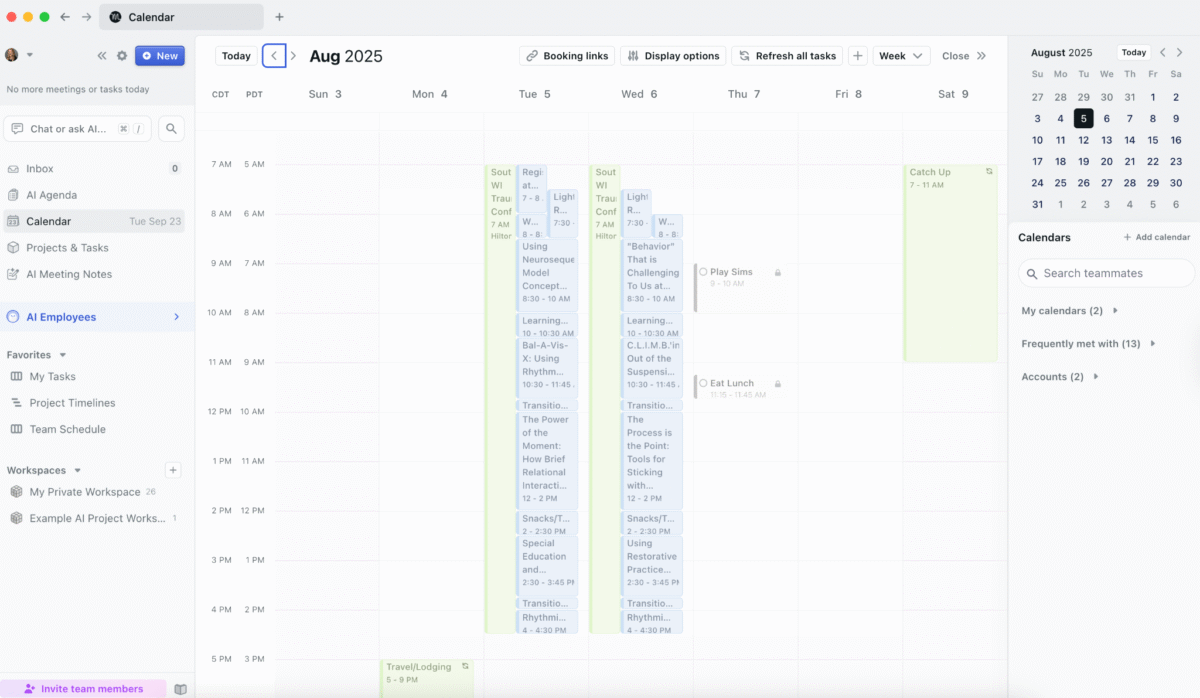
Here’s a screenshot of my calendar from the Motion desktop app during the week of August 3–8, 2025. I chose this example since my summer schedule is easier to share, and it highlights some of Motion’s features. The colors can be broken down like this:
- Green: work calendar
- Blue: personal calendar
- Gray: tasks added directly from the desktop app
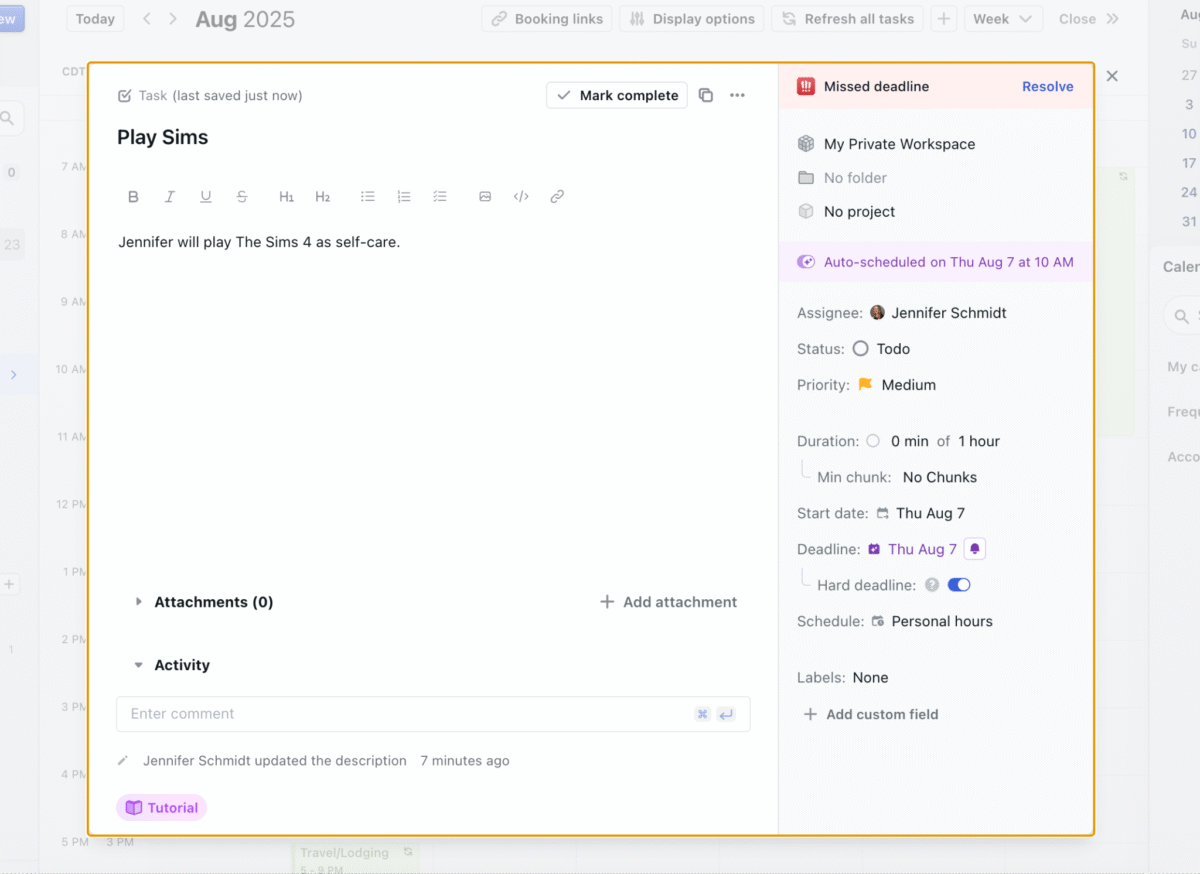
Here’s an example of how you can edit tasks directly from the calendar. I clicked on the ‘Play Sims’ entry and had options to reassign it, update the status (like from ‘to-do’ to ‘complete’), adjust the priority, change the duration, or edit the start and end times. You can also choose whether a task falls under work hours or personal hours. In this case, I’d schedule ‘Play Sims’ during personal hours.

One feature I really like in Motion is project templates. Here’s an example I set up for writing blog posts. Templates help users map out all the steps, prioritize them, estimate the time they’ll take, and make sure nothing gets missed. In this example, I kept it simple with researching, writing, and editing. However, you can always break tasks down further as needed.
In Summary
With a variety of tools on the market, Motion AI is one example of an AI Workplace that combines AI Employees, AI Tasks, AI Projects, AI Calendar, and related tools into a single platform. Before choosing any program, it is worth comparing options to see which one fits your work style, accessibility needs, and budget.
Motion AI is a paid product and can feel like a significant investment, especially for individuals using the platform outside of an organizational setting. If a free trial is available when you read this, you can use it to explore Motion first and review the latest pricing and billing details on usemotion.com so you understand when charges would begin.
In my experience, the trial period was enough time to experiment with templates, AI-powered scheduling, and project planning to see whether Motion’s approach to managing tasks and time lined up with my needs. If you decide to try Motion, choose a week when your schedule has some breathing room. Use that time to learn the system and experiment with it. Treat it as a helpful support for your work, not a quick fix for every problem.
TL;DR – (Too Long; Didn’t Read)
Motion AI is an AI Workplace that lets you hire AI Employees and use tools like AI Tasks, AI Projects, and AI Calendar to help individuals and teams manage tasks, schedules, and projects in one place. It can automatically prioritize and schedule work, adapt to changes in real time, and connect with your calendars and other tools to create structured daily plans. These features can be especially supportive for people with executive functioning challenges, such as difficulties with self-management, organization, or shifting between tasks.
Tools like Motion AI can reduce the mental load of managing complex workdays, support focus, and make it easier to protect time for rest and life outside of work. While Motion has a learning curve and is a paid product, its dynamic rescheduling, collaboration features, and project planning tools may offer meaningful support for both productivity and well-being. If a free trial is available when you read this, you can use it to explore the app before deciding whether to continue with a paid plan.
Further Reading
- Adams (2019) – The Value of Worker Well-Being
- Marquette University Graduate School of Management (2024) – Optimizing workplace productivity: Effective strategies for boosting efficiency
- Motion (2025) – Create Hundreds of AI Employees inside Motion’s Work Management Platform
- Project.co (2025) – The Use of AI in Project Management Statistics 2024
- PwC (2018) – The productivity agenda: moving beyond cost reduction in financial services
- TimeWatch (2024) – Time Management Statistics (New Research in 2024)
- Todoist (n.d.) – Time Blocking
- Turjeman-Levi, Itzchakov, Engel-Yeger (2024) – Executive function deficits mediate the relationship between employees’ ADHD and job burnout
- Understood – Trouble getting work done is real. Executive function challenges may be the culprit.
- Life Skills Advocate (2020) – Executive Functioning Skills 101: All About Organization
- Life Skills Advocate (2021) – Executive Functioning Skills 101: Flexibility
- Life Skills Advocate (2021) – Executive Functioning Skills 101: The Basics of Time Management
- Life Skills Advocate (2022) – Using Self-Management to Teach Healthy Living Skills