
It’s late, two IEPs are due Friday, and the present levels for one of them are finally written. An IEP goal generator offers to draft the annual goal in a few seconds, and what comes back looks finished: a tidy sentence, a confident verb, a percentage at the end.
Plenty of teachers take that offer. In NPR’s report on a Center for Democracy and Technology survey, 57% of special education teachers said they used AI to help develop individualized plans for students in the 2024-25 school year, up from 39% the year before.
The common assumption is that the tool does the hard part. It doesn’t. The draft is the easy part, and checking it is the job, because the goal ends up in a legal document your IEP team signs.
TL;DR
Six tools, one rule: the IEP goal generator drafts and the IEP team decides.
- Lernico and TeachQuill draft a goal with benchmarks and a measurement plan; Lernico needs no account.
- Playground IEP, Monsha and Brisk go wider, adding objectives, accommodations or progress-monitoring language.
- Advocate360, made by Life Skills Advocate, drafts executive function goals from a saved profile and assessment, and shows how each draft was built.
- Strip names, birth dates and rare details before you paste anything.
- Run every draft through a 6-part check: timeframe, student, condition, observable behavior, criterion tied to baseline, measurement method.
This is practical drafting guidance, not legal advice. Your district’s AI policy and your team’s judgment come first.
What an IEP Goal Generator Can and Can’t Do
An IEP goal generator is only as good as what it can know about the student.
A generator is quick with wording. It turns a few notes into a sentence with a condition, a verb and a number, and it gets you past the blank page at the end of a long day. Given the paperwork load special education teachers carry, that is worth something.
What it can’t know is the student. It has never seen your data sheet. It doesn’t know whether 80% is a stretch or a step backward from last spring, and it has no idea what your district’s IEP template asks for. A goal can read well and still have no baseline under it.
The research so far points the same way. In a randomized study of 22 novice special education teachers, ChatGPT raised the quality of their IEP goals and cut the time they spent drafting. A 2025 study that included experienced teachers found no statistically significant difference in quality ratings between goals written by special education teachers and AI-generated goals.
So a generator tends to help most while goal writing is still new, and it lands near a teacher’s draft rather than above it. Both studies are small and early. We couldn’t find a published head-to-head test of the specific tools below, so the comparison that follows is built from what each company says about its own tool.
Before You Type: Keep Student Data Out
Deleting the student’s name isn’t enough. The FERPA definition of personally identifiable information in 34 CFR 99.3 covers the name, but also a date of birth, a student ID number, and other information that, alone or combined, would let a reasonable person in the school community identify the student.
That last part catches more than people expect. A seventh grader at a small school, with a rare disability category and a named outside provider, can be identifiable with no name in the prompt at all.
Three rules hold up across most districts:
- Check your district’s approved tools first. Ask which AI tools are approved and whether a signed data agreement covers them. Rules vary a lot: according to Education Week’s report on the same survey, Georgia’s state guidance says educators shouldn’t use AI for “high stakes” purposes like IEPs.
- Describe the data, not the child. Give the tool the grade, the goal area and present levels with a baseline number. Leave out the name, birth date, school, ID numbers and any rare detail that points to one student.
- Names go back in later, inside your district’s IEP system, after the goal has passed the check below.
A de-identified request looks like this:
Notice what’s missing: a disability label standing in for data. “A 7th grader with ADHD” gives a generator nothing to measure against, so it hands back a goal that could belong to anyone. The baseline number is what lets the criterion fit this student.
6 IEP Goal Generators Compared
Dozens of tools now call themselves an IEP goal generator. These six each have a public page that says what the tool drafts, and every detail below comes from the company’s own pages, read in October 2026.
We didn’t run test goals through each one, so read the verdicts as a map of what each offers, not a quality ranking. Advocate360 is listed last because Life Skills Advocate makes it.
Four things separate them:
- What it drafts: just the goal, or benchmarks, accommodations and a measurement plan too.
- What you enter: whether the form wants present levels or only a grade and a category.
- Free option: no account, a credit cap, or a trial.
- Privacy statement: what the company says happens to what you type.
| Tool | What it drafts | What you enter | Free option | Privacy statement | Best for |
|---|---|---|---|---|---|
| Lernico | Annual goal, present level, 4 quarterly benchmarks, accommodations, data collection plan | Grade, disability category, goal area, current performance | Free, no account | Says nothing you type is stored | Teachers who want a full first draft without signing up |
| TeachQuill | Goal with benchmarks, success criteria and a measurement method | Grade, subject, current performance level | 30 credits a day; Pro $15/month billed yearly | Says it does not store student PII | Teachers drafting a few goals a day |
| Playground IEP | Standards-aligned goals with objectives and benchmarks, plus present-levels feedback | Not listed on its public page | Free account; Pro $10/month | Offers a data protection agreement that names FERPA | Schools that want a data agreement before teachers start |
| Monsha | Goals, accommodations, services and progress monitoring, with PDF and Word export | Grade, disability category, strengths, needs; optional uploads | 14-day Pro trial, then 500 credits a month; Pro $120/year | Privacy policy describes its FERPA and COPPA role | Case managers who want several IEP sections drafted at once |
| Brisk | SMART goals, benchmarks and progress-monitoring language | Grade level, document format, objectives | Free teacher plan; check that it includes this tool | Says inputs are never used to train AI models | Teachers who want goal drafting inside their browser |
| Advocate360 (made by LSA) | One measurable goal in a SMART structure, plus 2-4 short-term steps | A saved profile and an executive function assessment; IEP upload optional | 14-day trial, no card; then $20/month | Says data is encrypted, never sold and never used to train AI | Educators writing executive function goals for students they support all year |
Prices and free limits are approximate and change often; check each tool’s current page before you sign up.
1. Lernico
Lernico returns a full packet in one pass. The company says its free generator drafts a SMART annual goal, a present level, four quarterly benchmarks, accommodations, a data collection plan and instructional ideas, with no account, and the tool page says nothing you type is stored.
A packet that long is also a lot to check, so budget time to read every piece, not just the goal.
Best for: Teachers who want a full first draft without creating an account.
2. TeachQuill
TeachQuill stays close to the goal itself. The company describes its output as a complete goal statement with benchmarks, criteria for success and a method of measurement. The free plan’s 30 daily credits cover a few goals a day, and its pricing FAQ says the tools are designed so you never need to enter student names.
Best for: Teachers who write a few goals a day and want the measurement method drafted in.
3. Playground IEP
Playground IEP describes its IEP Copilot as drafting standards-aligned goals with scaffolded objectives and measurable benchmarks, and the wider suite gives feedback on present-levels drafts. The public page doesn’t list the input fields, so you see the form only after you sign up.
For schools, one detail stands out. Playground offers a data protection agreement that names FERPA, which gives a district something concrete to review before approving the tool.
Best for: Schools and teams that want a signed data agreement before anyone types a word.
4. Monsha
Monsha reaches past the goal into more of the IEP, drafting goals, accommodations, services and progress monitoring, with exports to PDF, Word, Google and Microsoft formats. Its page says you can also upload prior IEPs, assessments or observations.
The more sections it drafts, the more there is to review before any of it reaches the meeting.
Best for: Case managers who want several IEP sections drafted and exported in one place.
5. Brisk
Brisk installs free as a browser extension, so it opens alongside whatever you’re already writing in. The company says its generator produces SMART goals, trackable benchmarks and progress-monitoring language, and its privacy center says Brisk is SOC 2 Type II compliant.
Two things to check yourself: which Brisk plans include this tool, since the plans page doesn’t spell it out, and your baseline numbers, since the form doesn’t ask for present levels by name.
Best for: Teachers who want goal drafting inside the browser they already use.
6. Advocate360 (Made by Life Skills Advocate)
Life Skills Advocate makes Advocate360, so weigh this entry with that in mind. It drafts one measurable goal in a SMART structure, plus short-term steps, from a saved profile and an executive function assessment, and you can ask it to redraft in your team’s IEP wording.
It’s built around executive function, so it fits planning, task initiation and organization goals better than reading or math goals. A side-by-side table further down compares it with the other five, feature by feature.
Best for: Teachers, case managers and coaches writing executive function goals for students they support across the year.
Two more options come up often. Districts that already license MagicSchool can check its IEP tools first; its FAQ says they help draft goals, present levels, accommodations and service recommendations, and that teachers remain responsible for reviewing and finalizing all content. General chatbots like ChatGPT or Gemini can draft a goal too. Use them only through an account your district has approved.
How to Check an AI-Drafted IEP Goal in 6 Parts
How do you know an AI-drafted IEP goal is ready for the meeting? Run it through six parts, in order, and stop at the first one that fails.
IDEA sets the floor. Under 34 CFR 300.320, an IEP must include a statement of measurable annual goals and a description of how progress toward them will be measured. The six parts below are the format Life Skills Advocate’s goal-bank posts use, and they turn that floor into a checklist.
| Part | What to look for | Where quick drafts slip |
|---|---|---|
| 1. Timeframe | When the goal should be met: “By the end of the IEP period” or the annual review date | Left out, or “this year” with no end point |
| 2. Student | A [Student Name] placeholder while drafting; the real name goes in only inside your IEP system | “The student,” or a real name typed into the tool |
| 3. Condition | When, where or with what support: “when given a grade-level passage” | Missing, so nobody knows what counts as a fair try |
| 4. Observable behavior | An action two adults could watch and agree on: answers, writes, asks, begins | Verbs like “improve,” “understand” or “demonstrate awareness” |
| 5. Criterion tied to baseline | How well and how often, set from the present-levels number: “80% accuracy in 4 out of 5 trials” | A round number that ignores the baseline, or a percent with no denominator |
| 6. Measurement method | “As measured by” plus the method: teacher data collection, work sample review, teacher observation or self-rating | Left out, though the law asks the IEP to describe how progress is measured |
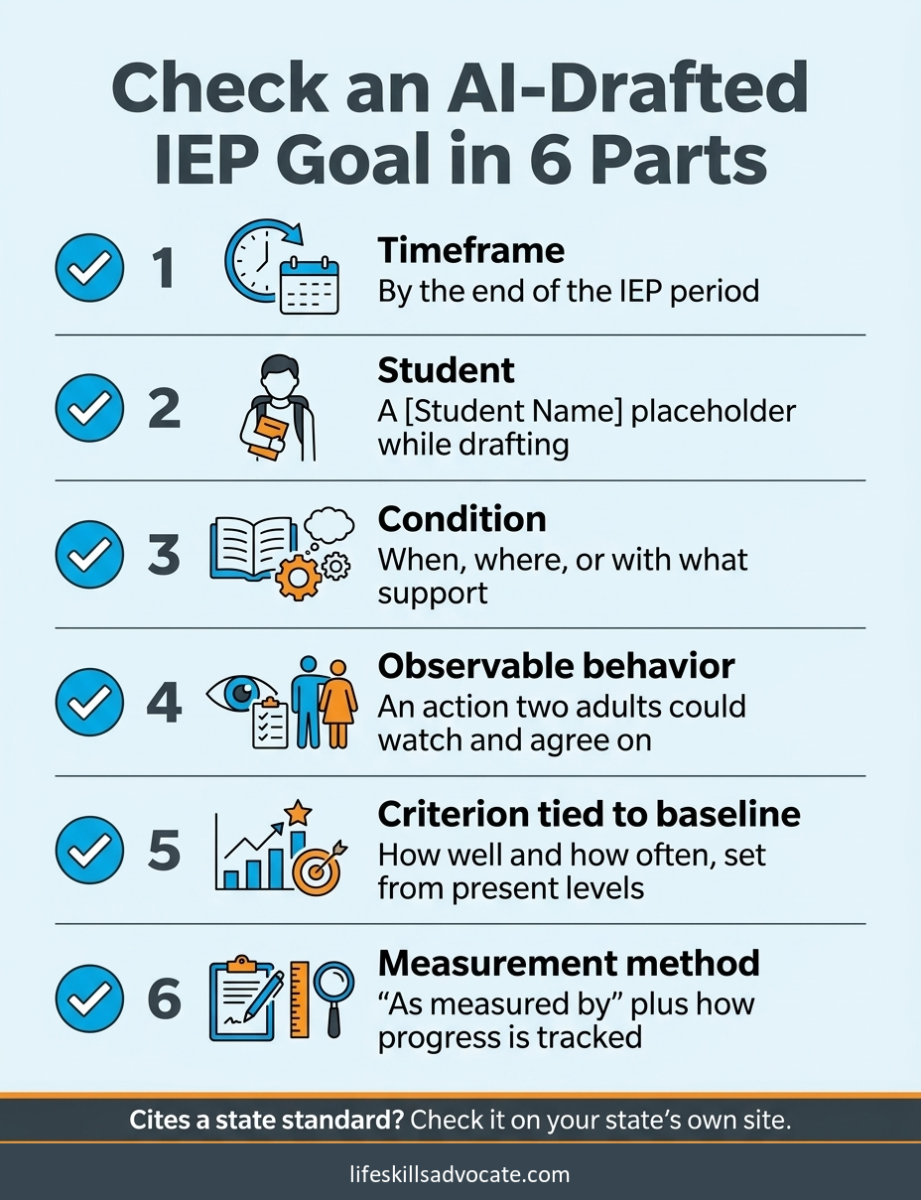
One more check sits outside the table: standards. If a draft cites a state standard, look it up on your state’s own standards site before you keep it. General AI tools can invent a standard or borrow one from another state.
Two side-by-side comparisons speed this up. Hold your draft next to a free IEP goal bank written in the same six-part format, and if the measurement method is the weak spot, these data collection worksheets give you a ready way to track it. For skills like planning or time management, a set of measurable executive functioning IEP goals sorted by skill area shows the format applied to more than 100 targets.
Fixing Three AI-Drafted Goals: Before and After
These three drafts are composites written for this article, each with the kind of gap an IEP goal generator can leave when the input is thin. The numbers in the repaired goals are examples; set yours from your own baseline data.
Before (reading comprehension): “The student will improve reading comprehension skills to grade level by the end of the year.”
Five of the six parts fail here. There’s no placeholder, no condition, “improve” isn’t something you can watch, “grade level” isn’t a criterion, and nothing says how progress is measured. Say the present levels show 2 of 5 questions correct (40%) on grade-level passages. The repaired goal:
- By the end of the IEP period, when given a grade-level passage of about 300 words, [Student Name] will answer literal and inferential comprehension questions with 80% accuracy in 4 out of 5 trials as measured by teacher data collection.
For more goals built this way, these reading comprehension IEP goals cover vocabulary, key details and inference.
Before (task initiation): “Student will start tasks independently 80% of the time.”
No timeframe, no placeholder, and “independently” is never defined. The 80% has no denominator, and there’s no method. Suppose classroom observation shows the student starts within two minutes of the direction on 1 of 5 written assignments. Now there’s something to aim from:
- By the end of the IEP period, when given a written assignment and a visual first-step checklist, [Student Name] will begin the first step within 2 minutes of the direction in 4 out of 5 observed opportunities as measured by teacher observation.
The checklist in the condition matters, because it names the support the goal assumes. More examples sit in these task initiation goals.
Before (self-advocacy): “The student will self-advocate in all classes with 90% accuracy.”
“Self-advocate” covers a dozen different behaviors, “all classes” isn’t a condition, and 90% of what? Pick one behavior the team can count. If two weeks of tallies show the student asks for help on 1 of 5 unclear tasks, here is the repaired goal:
- By the end of the IEP period, when a task or direction is unclear, [Student Name] will ask the teacher a specific question about the task in 3 out of 4 observed opportunities as measured by teacher data collection.
There are 60 more observable behaviors to choose from in these self-advocacy IEP goals.
Advocate360 Side by Side With the Other Five
Life Skills Advocate makes Advocate360, so this section compares it with the other five tools from the companies’ own pages, nothing more. Advocate360 starts from a profile of the person and an executive function assessment that the goal is drafted from.
Each draft comes with a “How This Goal Was Created” panel that shows how the profile and the assessment shaped the wording, so you can explain the goal in a meeting or change it.
| Feature | Advocate360 | The other five, per their own pages |
|---|---|---|
| Starting point | A saved profile (strengths, challenges, motivators) plus an executive function assessment | Lernico, TeachQuill, Monsha and Brisk use a form you fill in for each request; Monsha also takes uploaded prior IEPs, assessments or observations |
| Refining a draft | Ask for changes, including your team’s IEP wording, and it redrafts | TeachQuill and Monsha say to review and edit the output before using it |
| Saved records | Profiles carry over between goals; 10 included on the $20 plan | Playground IEP describes itself as caseload management software; caseload saving is part of the paid Lernico platform |
| Accommodations | The executive function assessment recommends accommodations | Lernico and Monsha draft accommodations alongside goals |
| Goal areas | Built around executive function skills | Academic and functional areas, including reading, math and behavior (Lernico, TeachQuill) |
The trade-off is plain in the last row. If you need a reading or math goal drafted from scratch, one of the other five is the closer fit. If the goal is about planning, starting work or keeping track of materials, and you’d like to see why the draft says what it says, Advocate360 is built for that. Either way, the draft still goes through the six-part check.
When you’d rather start from goals that are already written, the Comprehensive IEP Goal Bank ($29) holds 2,142 goals across six domains in a spreadsheet you can sort and edit.
IEP Goal Generators: What the Research and Rules Say
The table below collects the findings this article leans on, each linked to its source.
| IEP goal generators: finding | What it means | Source |
|---|---|---|
| 57% of special education teachers surveyed used AI to help with IEPs or 504 plans in 2024-25, up from 39% in 2023-24 | AI drafting is already common, and district rules are still catching up | CDT survey via Education Week (2025) |
| In a randomized study of 22 novice teachers, ChatGPT raised IEP goal quality and cut drafting time | A generator helps most while goal writing is still new | Rakap (2023) |
| Goals written by special education teachers and AI-generated goals showed no statistically significant quality difference (p = .67) in a 2025 study | Generated goals land near a teacher’s draft, not above it | Waterfield et al. (2025) |
| IEPs must include measurable annual goals and describe how progress toward them will be measured | Any generated goal still needs a criterion and a measurement method | 34 CFR 300.320 |
| FERPA’s definition of identifying information includes date of birth and details that, combined, point to one student | Deleting the name isn’t enough before pasting into a tool | 34 CFR 99.3 |
Frequently Asked Questions About IEP Goal Generators
Can ChatGPT write IEP goals?
Yes, ChatGPT can draft an IEP goal, and the draft can be decent. In a 2025 study, goals written by special education teachers and AI-generated goals showed no statistically significant difference in quality ratings.
Two limits matter more than the wording. A personal ChatGPT account isn’t covered by any agreement with your district, so student information stays out of it unless your district has approved that account. And the draft still has to pass the same check as any other goal: timeframe, student, condition, observable behavior, criterion tied to baseline, and measurement method.
Newer teachers may get more out of it. A randomized study of 22 novice special education teachers found ChatGPT raised their goal quality and cut drafting time. It does its best work with de-identified present levels that include a baseline number, one goal at a time.
Is there a free IEP goal generator?
Yes. Lernico‘s generator runs with no account, TeachQuill gives 30 free credits a day, and Playground IEP‘s Copilot is free with an account. Free limits change, so check the current terms first.
Do IEP goal generators make every student’s goals sound the same?
They can, and the cause is usually the input, not the tool. A form filled in with a grade, a disability category and a goal area gives every generator roughly the same starting point, so two students in the same category can come back with nearly identical goals.
Present levels with a baseline number change that. “Answers 2 of 5 inferential questions on grade-level passages” points to a different goal than “loses track of multi-step directions after the first step.” Families read these goals closely, and a goal that could belong to anyone tends to stand out.
Are AI-drafted IEP goals allowed?
We couldn’t find a federal rule that addresses AI-drafted IEP goals directly. IDEA requires measurable annual goals and a description of how progress is measured, and it says nothing about who or what writes the first draft. State guidance varies; Georgia’s, for one, steers educators away from AI for IEPs. Where your own district stands is a question worth asking before the next meeting, not after.
How many parts does an IEP goal have?
It depends on whose list you use. Checklists online name anywhere from four to six parts. This article uses six, adding a timeframe and a measurement method, so nothing measurable gets skipped. IDEA separately requires the IEP to say how progress will be measured, which is why the method earns its own spot.
Next Steps
The next IEP on your calendar is the best test case, because it already has real data behind it.
- Your district’s approved-tools list. Ask which AI tools are approved and whether a data agreement covers them; one email settles most of the privacy question.
- Run one goal you already wrote through the six-part check today, before trying any tool.
- Try a no-account generator with a de-identified present-levels note, then compare its draft with yours.
- When you’d rather start from finished goals, browse the free IEP goal bank or the Comprehensive IEP Goal Bank, both written in the same format.
Further Reading
- Overworked and Understaffed: Special Ed Teachers Turn to AI for Help – NPR
- Teachers Are Using AI to Help Write IEPs. Advocates Have Concerns – Education Week
- Chatting With GPT: Enhancing Individualized Education Program Goal Development for Novice Special Education Teachers – Rakap, Journal of Special Education Technology
- IEPs in the Age of AI: Examining IEP Goals Written With and Without ChatGPT – Waterfield et al., Journal of Special Education Technology
- 34 CFR 300.320: Definition of individualized education program – eCFR
- 34 CFR 99.3: FERPA definitions – eCFR
- Free IEP Goal Generator – Lernico
- IEP Goal Generator – TeachQuill
- IEP Copilot – Playground IEP
- IEP Generator – Monsha
- AI IEP Goal Generator – Brisk Teaching
- MagicSchool AI FAQ – MagicSchool
- Advocate360 Goal Generator – Life Skills Advocate
- Advocate360 Executive Function Assessment – Life Skills Advocate
- 100+ Measurable Executive Functioning IEP Goals – Life Skills Advocate
- 9 Ways to Recover From Special Education Teacher Burnout – Life Skills Advocate
- 69 IEP Reading Comprehension Goals – Life Skills Advocate
- 12 Task Initiation IEP Goals – Life Skills Advocate
- 60 Self-Advocacy IEP Goals – Life Skills Advocate
- Free IEP Goal Bank – Life Skills Advocate
- Data Collection Worksheets – Life Skills Advocate
- Comprehensive IEP Goal Bank – Life Skills Advocate